
CampaignManager
Targeted Advertising Management

Despite the proliferation of new platforms and increasing fragmentation in the market, TV remains the most powerful media and the most effective way to address large audiences. CampaignManager deals with content management (ads, news, weather…), playlists and AsRun logs as defined in the SCTE-118-3 standard. In particular, CampaignManager manages and centralizes configuration and communication towards ENENSYS’ AdsEdge/vAdsEdge Ads splicers.
Highlights
Centralized Ad Insertion Manager
From one central point, CampaignManager manages your whole Ads Insertion System. It allows each content provider to upload content to insert and playlists and to download AsRun logs as a proof of insertion. On a regional basis, it handles the delivery of content (ads, news, etc.) and playlist files for each AdsEdge. It monitors AdsEdge alarms and insertion status.
Control Splicing for SFN Network
CampaignManager monitors all of the AdsEdge in your network so that it can control the splicing per SFN area. This guarantees SFN broadcasting based on the configuration and the content availability for each AdsEdge of a particular region.
Playlist Manager
Based on industry-standard interfaces, CampaignManager makes it possible for you to create, edit or duplicate a playlist compliant with the SCTE-118-3 standard. Providers can also upload their own SCTE-118-3 or CSV playlists over FTP.
Control Encoding before Insertions
CampaignManager analyzes the spots scheduled for insertions and can automatically transcode them to the live format, allowing seamless insertions by the AdsEdge. In addition, CampaignManager is able to generate VBR packages for content insertion in Statmux streams.
Applications
- AdsEdge files and control manager
- Files Content Management System
- Content provisioning through FTP
- Content checking (Ads, Playlists)
- Regional playlist creation/edition/duplication
- In-band or out-of-band file delivery
- Live monitoring/statistics
- AsRun logs reconciliation
Other Benefits
- Manage the whole ad insertion topology through one unique central point
- Multitenant applications to allow different ads sales houses
- Friendly-user interface, designed for advertising and marketing planners
- Central reporting : dashboard, logs and alarms
- Automatic dispatch of content and playlist
- SCTE-118 AsRun logs allowing accurate ad invoicing
Technical specifications
FEATURING
Standards
SCTE-118-3 for Playlists and AsRun logs
Provisioning
MPEG-2 TS files
SCTE-118-3, XLS, XLSX and CSV Playlists
Content Checking
Check playlist compliancy with SCTE-118-3 standard, codecs and content files format
AdServer interoperability
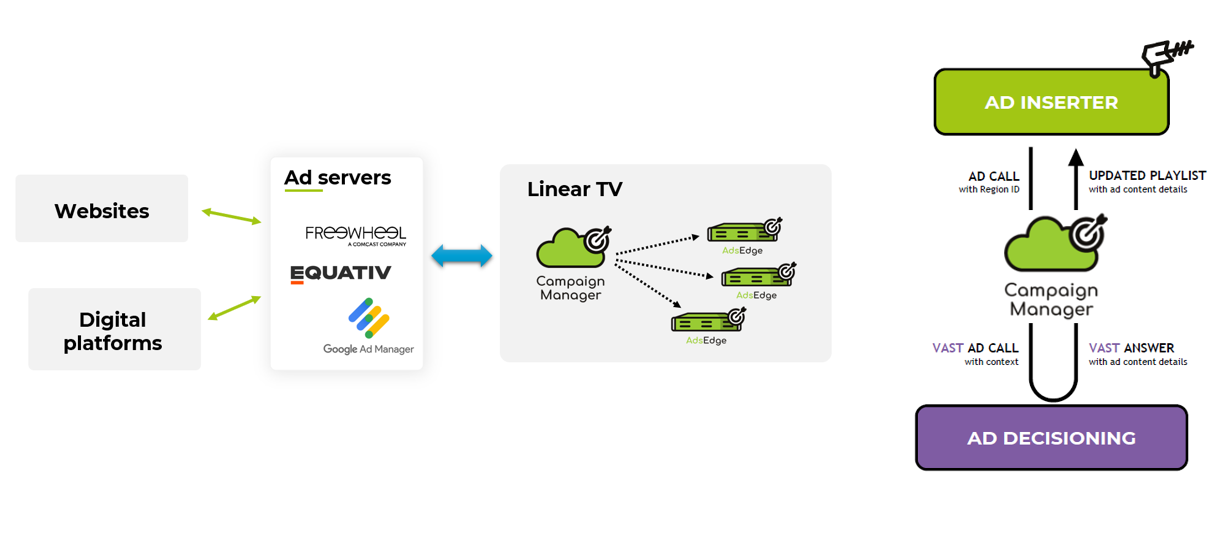
Connect ENENSYS Ad Insertion system to an external Ad Decisioning server and use your digital ad inventory on Linear TV.
Playlist Management
Enables creating, updating and duplicating regional playlists
Files Delivery
Out-of-band file delivery over FTP (Push or Pull mode)
In-band file delivery using FDP
SFN Management
Automatic or manual splicing control per SFN area to guarantee SFN broadcasting
AsRun Logs
Automatic fetch of AsRun logs
Analysis for Ad insertion monitoring
Available for traffic system
Monitoring
Highly detailed dashboard for at-a-glance monitoring the entire operational system
Monitoring of AdsEdge, content, service and region levels
Users Management
Mutlitenant capable
Separate and secured users access between administrators and providers.
Each provider can only access their own files
Redundancy
1+1 automatic redundancy based on active/standby mode
GUI
HTML5 web-based interface
Hypervisor
VMWare ESXI 6.5+
Ad Server Interoperability
Ordering codes
CampaignManager - ACCESS
Ads Campaign and playlists Management - Software license
- 100x AdsEdge/vAdsEdge support
Ordering Code: XANV-CM00-0000